What's New in OrangeHRM 8.3: HR Software Updates That Simplify Everyday HR Work

Key Takeaways
-
OrangeHRM 8.3 adds two new Citra AI agents that help recruiters rank candidates and let any user ask plain-language questions about their reports.
-
A restructured compensation setup gives HR clearer pay records, guided approval steps for pay changes, and a full salary history trail.
-
Managers gain tighter control over schedules and pay through shift swap approvals, excess hours requests, and pay policies that can be updated without starting over.
-
Performance reviews get faster and fairer with AI appraisal summaries, a SMART goal checker, and year-round continuous feedback.
-
Onboarding, training, surveys, notifications, and the mobile app all gain time-saving updates that cut manual follow-up for HR teams.
OrangeHRM 8.3 is a feature release of the OrangeHRM HR software platform that brings AI help into recruiting and reporting, gives HR a more structured way to manage pay, and tightens control over shifts, overtime, and attendance. It also makes performance reviews quicker to complete and adds year-round feedback, so HR teams spend less time on admin and more time on people.
Every release aims to remove a few of the small, repetitive tasks that eat into an HR team's week. This one focuses on the moments where HR most often loses time: screening large applicant pools, chasing approvals, correcting pay records, and following up on overdue reviews or training.
The sections below walk through the most useful updates by area, starting with Citra AI and moving through compensation, scheduling and attendance, performance management, onboarding and engagement, and the mobile app. Each section explains what changed and why it matters in day-to-day HR work, followed by a short action plan for getting started.
What Is OrangeHRM 8.3?
OrangeHRM 8.3 is the latest version of OrangeHRM, an HR software platform used to manage the full employee lifecycle, from hiring and onboarding to pay, scheduling, performance, and engagement. The release extends Citra, OrangeHRM's built-in AI assistant, and adds new controls for compensation, attendance, and reviews.
How Does Citra AI Help HR Teams in OrangeHRM 8.3?
Citra now helps recruiters screen candidates, answers questions about reports, assigns leave in bulk, and explains roster data, all through plain-language requests.
Recruiting is where most organizations start with AI. According to SHRM's State of AI in HR 2026 report, recruiting is the most common HR area for AI use, at 27% of organizations surveyed. Citra builds on that by bringing AI directly into the day-to-day screens HR already uses.
Citra Recruitment Agent
Recruiters no longer need to open applications one by one. Citra reviews applicants for a vacancy against the job description, ranks them, and highlights skill gaps or concerns.
-
Shortlist, reject, or move several candidates forward with a single request.
-
Check interview schedules and submit interviewer feedback through Citra.
-
Compare feedback across candidates before making a decision.
Every ranking is labeled as a suggestion, so the hiring decision always stays with the recruiter. For teams new to structured hiring, the applicant tracking system entry explains how candidate tracking fits into the wider process, and this look at why hiring plans need an AI-powered ATS covers the bigger picture.
Citra Report Analysis Agent
Any report in Reports & Analytics can now be questioned in plain language, for example, "What are the top candidate sources?" This removes the need to export reports into a spreadsheet for follow-up analysis. Figures are calculated exactly, not estimated, and answers only cover data the user is already allowed to see.
Bulk Leave Assignment
Administrators can assign leave to many employees at once by uploading a single file to Citra. The file is checked for errors before anything is confirmed, which replaces the old one-employee-at-a-time process.
Roster Analytics
Managers can ask Citra questions about scheduled hours or shift coverage without building a report first.
What Changes for Compensation and Employee Records?
Pay is now recorded in a clear, structured way, pay changes follow a guided approval path, and duplicate employee IDs can no longer slip into the system.
A More Structured Compensation Setup
Instead of a single annual salary figure, HR now records three simple details: the base pay amount, how it is paid (for example, hourly or annually), and how often it is paid. OrangeHRM then works out the pay per pay period automatically, so there is no manual math and fewer errors.
Once a pay structure is set, it is protected from casual edits. Any change to pay basis, frequency, currency, or pay grade goes through a short, guided process:
-
Choose an effective date: HR picks when the change should apply, so past and future pay stay accurate.
-
Confirm the change: The system asks HR to acknowledge what is changing before saving.
-
Check against the pay grade: The new pay is validated against the minimum and maximum for the employee's grade.
-
Record the history: Every structure change is logged in the employee's salary history and audit trail.
The same structure follows a person from job offer to employee record. Recruiters set pay at the offer stage, it carries through automatically, and the details can be used in offer letters, emails, and reports.
Unique Custom Fields
HR can now mark a custom field as unique, which stops the same value from being saved for two employees, including past employees. This protects identifiers such as badge numbers, access card IDs, and payroll reference codes, where a single duplicate can break attendance tracking or payroll.
How Does OrangeHRM 8.3 Improve Scheduling, Attendance, and Time Tracking?
Managers approve shift swaps and extra hours before they are paid, pay rules can be updated in place, and attendance reviews happen on one screen.
Manager Approval for Shift Swaps
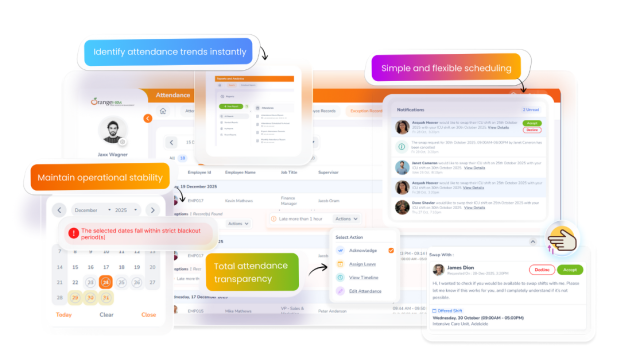
Organizations can now require a manager's approval before an employee-initiated shift swap takes effect. Both shifts show as pending until the manager decides, so coverage gaps and unapproved changes are caught early.
Roster Reports With Open Shift Coverage
A new shift group report shows assigned, published, and unassigned shifts together, making it easy to spot open coverage. Updated charts can display up to four measures at once and split results by location.
Excess Hours Approval
Time worked beyond a scheduled shift can now be requested, approved, and tracked in one place.
-
Employees apply for extra hours, past or planned, with comments and attachments.
-
Supervisors or HR approve, reject, or assign extra hours in advance.
-
Only approved hours are paid, and approval clears related attendance exceptions.
-
Every action is recorded in the audit trail.
Pay Policy Updates With Version History
HR can edit a pay policy directly, even when employees are already assigned to it. Each change is saved as a named version with a start date, and affected attendance records are recalculated automatically. A version history makes it easy to review or correct past changes.
Fair Pay on Leave Days
A new pay rule pays both leave hours and worked hours when an employee works part of a leave day. Previously, only the worked hours were paid.
One Screen for Attendance Review
The attendance sheet and approval screens are now combined. Managers can filter, save default views, export, and approve sheets in bulk, while the exception screen clearly shows punches, shifts, and total hours for each issue.
Bulk Timesheet Approval
Supervisors can approve several timesheets at once instead of one at a time.
|
Task |
Before 8.3 |
With 8.3 |
|
Shift Swaps |
Took effect immediately |
Optional manager approval |
|
Extra Hours |
No built-in approval step |
Requested and approved in OrangeHRM |
|
Pay Policy Changes |
New policy, then reassign employees |
Edit in place with dated versions |
|
Work on a Leave Day |
Only worked hours paid |
Leave and worked hours both paid |
|
Timesheet Approval |
One at a time |
Bulk approval |
How Is Performance Management Faster and Fairer in 8.3?
AI shortens the final review, goals are checked as they are written, and feedback can now be recorded at any point in the year.
72%
of workers could not say they trust their organization's performance management process, according to Deloitte's 2025 Global Human Capital Trends survey. The same research found 61% of managers felt the same way.
Trust grows when reviews feel consistent, timely, and grounded in real examples. The 8.3 performance updates are built around that idea.
AI Appraisal Summary for Final Reviewers
Final reviewers receive an AI-generated summary of the completed appraisal. They can understand the full picture quickly, then dig into any section that needs a closer look.
SMART Goal Checker
As a goal is written, it is checked against the SMART criteria: specific, measurable, achievable, relevant, and time-bound. The checker points out which criteria are missing, so weak goals are fixed before the review cycle starts.
Competencies Rated by the Right People
Each custom competency in an appraisal template can be assigned to specific evaluators, such as the employee or the supervisor. Only those evaluators rate it, which keeps scores relevant.
Easier Appraisal Cycle Setup
Administrators can choose which custom fields appear as filters when adding employees to an appraisal cycle, then add people in bulk using groupings that match their own organization.
Year-Round Continuous Feedback
A new Continuous Feedback tab on every performance profile lets supervisors, department heads, and approved feedback providers record feedback at any time, with no setup required. Feedback the employee cannot see is clearly marked, and supervisors can now view their direct reports' reviews.
"Feedback works best as an everyday habit, not an annual event."
For a deeper walkthrough of building that habit, see Performance Management: The Complete Guide for HR Leaders and this piece on why tracking employee performance requires a new playbook.
What Is New for Onboarding, Training, Surveys, and Everyday Workflows?
New-hire documents land in the right place automatically, ready-made apps cover common requests, and reminders do more of the follow-up work.
Preboarding Documents Sync to Employee Records
Files collected during preboarding now move automatically into the matching sections of the employee record once the new hire is approved. HR no longer needs to download and re-upload documents.
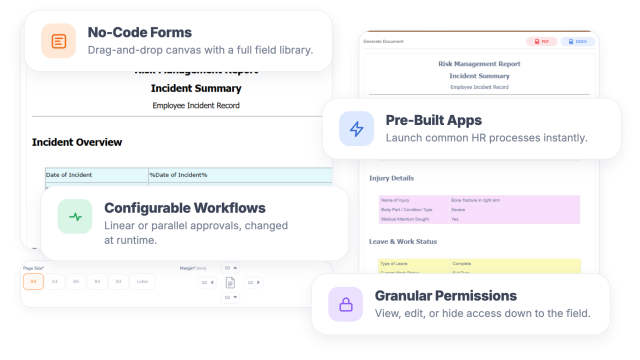
Ready-Made Apps in App Builder
A new App Library offers pre-built apps that organizations can use as delivered or adjust before publishing:
-
Coaching
-
Travel and expense reimbursements
-
Employee requests
-
Health and safety
-
Succession planning
Training Compliance Report
A new filter shows employees who have not taken part in a training session, and the report can be scheduled. HR can follow up on missing training well before an audit.
Flexible Survey Deadlines
HR can extend a survey's due date for employees who have not yet responded, without relaunching it. Surveys can also run without a due date.
Smarter Notifications
-
Employees are told right away when they are removed from a published shift.
-
Employees and managers get an email when a review is created or submitted, with a direct link.
-
Training participants receive automatic reminders before a session starts.
-
Survey reminders and due date changes are sent automatically.
-
Onboarding and offboarding task emails include a Mark as Complete button, so assignees can close tasks without logging in.
What Can Employees and Managers Do on the Mobile App?
Many of the new approvals and feedback tools now work on a phone, so decisions do not wait for someone to get back to a desk.
-
Personal dashboards: Employees see their leave balance, leave requests, timesheets, time at work, and goals in one profile view.
-
Reviews and feedback: Employees and managers can complete reviews, and approved users can give continuous feedback on the go.
-
Shift management: On-call shifts are clearly marked, managers can approve or reject shift swaps, and push notifications flag published or removed shifts.
-
Extra hours: Employees can request excess hours, and supervisors can act on those requests from their phone.
How Does OrangeHRM Support HR Teams Through This Release?
OrangeHRM brings hiring, pay, scheduling, performance, and engagement into one HR software platform, so each 8.3 update builds on data HR already has.
Because every module shares the same employee record, an update in one area flows into the others. Pay set at the offer stage appears in the employee file, approved extra hours feed straight into attendance, and continuous feedback is waiting when the appraisal opens.
-
OrangeHRM AI powers Citra across recruiting, reporting, leave, and scheduling.
-
Recruitment and Onboarding carry each hire from application to first day.
-
Time and Attendance and Roster keep schedules, hours, and pay rules aligned.
-
Performance Management supports goals, appraisals, and year-round feedback.
The Takeaway
OrangeHRM 8.3 focuses on the everyday moments where HR loses the most time: screening candidates, approving hours and shift changes, keeping pay records accurate, and running reviews people trust. By adding AI where it removes repetitive work and approval steps where they protect accuracy, this HR software release helps HR teams move faster without giving up control.
Frequently Asked Questions
What is new in OrangeHRM 8.3?
OrangeHRM 8.3 adds two new Citra AI agents for recruiting and report analysis, a more structured way to manage compensation, and approval steps for shift swaps and extra hours. It also brings AI support to performance reviews, year-round continuous feedback, and time-saving updates to onboarding, training, surveys, notifications, and the mobile app.
Does Citra AI make hiring decisions?
No. Citra ranks candidates and highlights strengths and gaps, but every ranking is labeled as a suggestion to support the recruiter. The final decision always stays with the hiring team.
How does excess hours approval work?
Employees request extra hours, either before or after they work them, and a supervisor or HR administrator approves or rejects the request. Only approved hours are paid, and every step is recorded in the audit trail.
Can HR change a pay policy without reassigning employees?
Yes. HR can edit a pay policy directly, name the new version, and choose the pay period it starts from. Affected attendance records are recalculated automatically, and earlier versions stay visible in the version history.
What is continuous feedback in OrangeHRM?
Continuous feedback is a tab on each employee's performance profile where supervisors, department heads, and approved providers can record feedback at any time of year. It sits separate from formal reviews and needs no setup to start using.
Why should HR teams keep their HR software up to date?
Regular updates bring new automation, stronger controls, and fixes that reduce manual work and errors. Staying current means HR teams can use features like AI screening and bulk approvals as soon as they are available.